What is SkyPass and who is it for?
SkyPass is a fresh approach to flight training, a new virtual type rating platform by PropairFlight designed for Microsoft Flight Simulator pilots. Whether you're a professional pilot, a student, or a flight sim enthusiast hoping to learn a specific aircraft through structured, instructor-level guidance, we invite you to come try it out.
How do I begin my first type rating course?
After creating your account, go to Browse Type Ratings from the dashboard or sidebar. Select an aircraft, purchase the course, and you will be enrolled immediately. Start with the Ground School section, as it is a prerequisite before unlocking Practical Training that you can use in MSFS.
Do I need any prior experience to use SkyPass?
While basic flight simulator knowledge is helpful, our platform provides comprehensive ground school modules to guide you from the basics up to advanced procedures.
What simulator platforms are supported?
Currently, SkyPass is heavily integrated with Microsoft Flight Simulator (MSFS) due to our telemetry client and logging capabilities.
How to contact Support?
If you need help, first check the FAQ for an answer, then ask for assistance on Discord, and if you still need support, open a ticket in JSM.
How to join the SkyPass Community (Discord)?
Join us on Discord! https://discord.gg/dUtDQDSBFP
Feel free to jump in and try it out! We aim to respond right away, and our awesome community is always hanging out to help each other to earn their wings.
How do I create an account?
Click Register on the login page and follow the registration steps. You will need to provide your email address and create a password.
I haven't received the account activation email. What should I do?
Check your Spam/Junk folder first. If you still cannot find the email, make sure you entered the correct email address and request a new activation email.
How do I activate my account?
After registering, you will receive an activation email. Click the activation link in the email to verify your account and complete the registration process.
I forgot my password. How can I reset it?
Click Forgot password? on the login page and enter your registered email address. You will receive an email with instructions to create a new password.
I didn't receive the password reset email.
Check your Spam/Junk folder and make sure you are using the email address associated with your account. You can also request another password reset email.
Why can't I log in even though my email and password are correct?
Make sure your account has been activated and that you are using the correct login method. If the problem persists, try resetting your password or contact our support.
Can I log in using my Google account?
Yes. Select Sign in with Google and choose the Google account you want to use to log in.
What should I do if I think someone else has access to my account?
Change your password immediately and contact your administrator or support team if you suspect unauthorized access.
What is Ground School?
Ground School provides the theoretical knowledge you need before starting your practical training. It includes learning materials and exercises designed to help you prepare for your Type Rating.
Can I skip the Ground School?
No. Completing the Ground School is required before you can begin Practical Training. It ensures you have the necessary aircraft knowledge, systems understanding, and procedural foundation to successfully progress to the practical phase.
How should I complete the Ground School modules?
The modules are presented in a recommended order based on your Learning Path. However, you are free to complete them in any order and study at your own pace.
Can I study the modules at my own pace?
Yes. You can read through each module at your own pace and return to the learning materials whenever you need to review something.
Can I practice with the Questionnaire?
Yes. The Questionnaire is available as a separate practice activity that you can use to test and improve your knowledge. It is optional and does not affect your Ground School results.
Can I practice with Flashcards?
Yes. Flashcards are also available as a separate practice activity to help you review and reinforce what you have learned. They are optional and do not affect your Ground School results.
What is Practical Training?
Practical Training allows you to apply the knowledge you learned during Ground School by completing a series of flights and tasks in MSFS.
How does Practical Training work in SkyPass?
Practical Training consists of a series of flights and tasks. It consists of structured flight tasks building on each other, helping you to operate the aircraft with more and more knowledge and confidence. Going through all tasks you will have all the skills to pass the final Type Rating Checkride.
What should I do during a flight mission in Skypass?
Each flight includes a Briefing that explains the objectives, requirements, and tasks you need to complete during the flight, which you can find in the Flight Missions section.
You can start by carefully reading through the briefing, you may also print out the necessary charts and flight mission one-pager to support your flight.
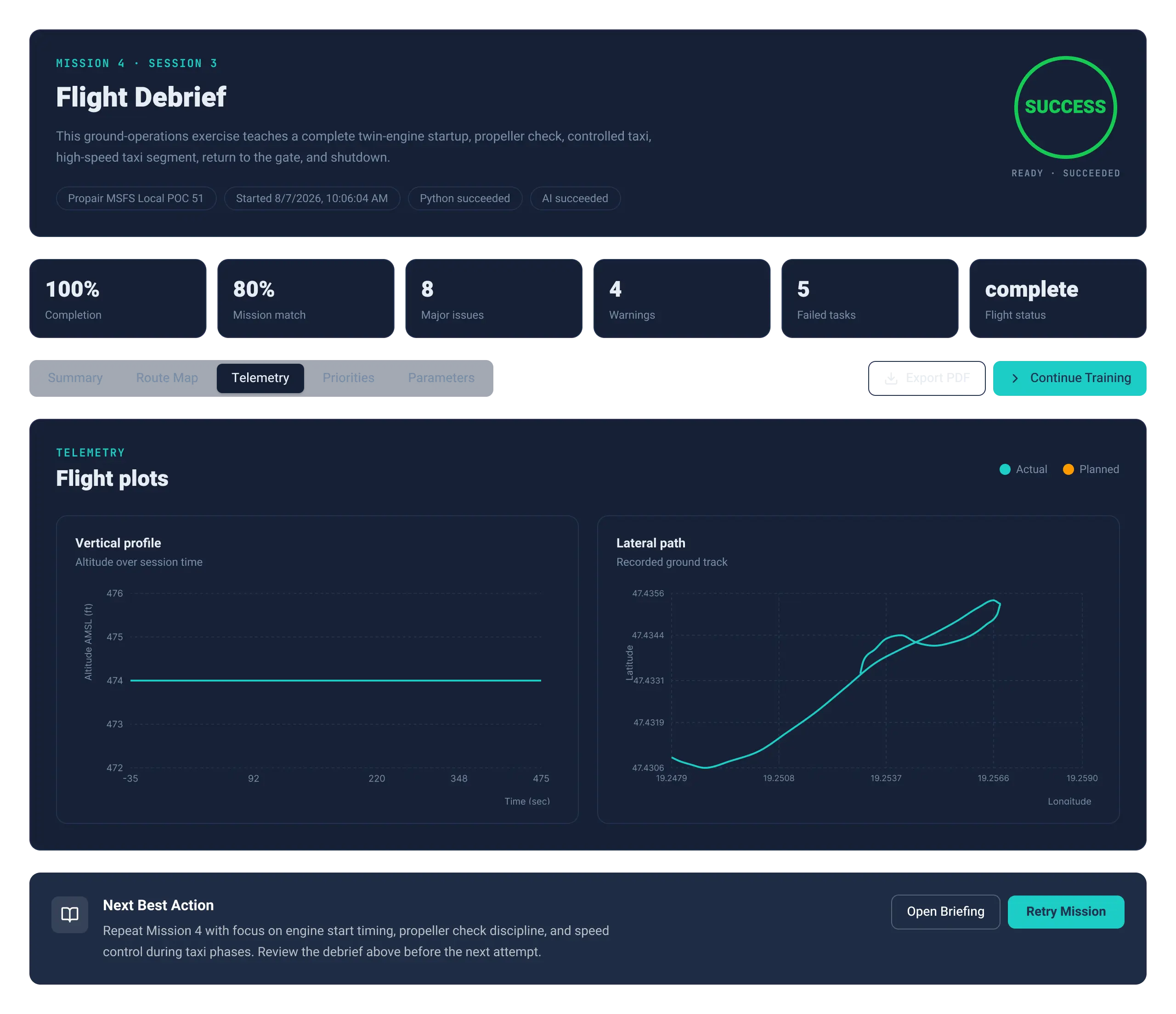
Then you are going to fly through individually the mission in the flight simulator and you will find the debriefing shortly after your flight in the Flight Log section in SkyPass or under the Flight Briefing as well.
Is SkyPass utilizing the MSFS missions?
SkyPass is not using any built-in mission function in MSFS. To give maximum freedom on location and mission complexity everything is defined to evaluate only based on the flight data.
How do I log my flight?
You need to start logging your flight through the SkyPass Mission Controller in the flight simulator. Select the mission you will fly, and activate it before you start. You can find a detailed user manual how to handle the Mission Controller in the Useful Materials section.
Can I abort the flight if I screwed up the mission?
In case you think you did something which would drive to fail your mission, you do not need to finish the flight or let SkyPass to evaluate your effort. Simply hit Abort on the SkyPass Mission Controller to stop logging.
These flights will not show up in your flight log and also no SkyPass credits will be used.
How do I start my practical training in SkyPass?
First, you need to unlock the Practical Training by completing the Ground School exam. Once it is unlocked, you can start your Practical Training flights from the Mission Controller in MSFS.
How are my flights evaluated?
During the flight many important parameters of the flight are collected. After you successfully finish the mission and stop the logging in the Mission Controller, the raw data is going through a complicated mapping process.
The engine catches lateral and vertical phases of the flight while monitoring important operational metrics, most importantly ITT - engine temperature, gear and flaps position and many more.
When the flight is mapped out, it is compared to the mission description, how close the pilot was able to follow them. The final evaluation comes from 2 main area:
• General aircraft handling - attitudes and parameters should be kept in mind all the time (like Vne)
• Mission specific requirements - climb to a designated altitude, follow an ILS approach, etc.
The result can be PASS, PASS with minor issues, and FAIL.
Where should I fly the practical missions?
There are a lot of missions which you can fly anywhere in the world, at the airport of your choice - just make sure you can comply with the requirements in the briefing.
Other missions, where SkyPass also monitors accuracy of landing, approach or following a designated route, you are required to fly from the airport marked in the briefing. All missions can be flown with the standard airports out from the simulator, no additional add-on is needed.
Where can I see my flight results in SkyPass?
You can view your flight evaluation results and flight performance in the Flight Log.
How do I unlock the next practical flight task?
There are some missions which does not require any flight, just to do some preparation in the aircraft, those missions can be completed with the Complete mission button.
The flight missions require you to fly with high precision the mission as described in the briefing and you need to pass the test, which unlocks the next mission.
In case you miss a mission 3 consecutive times, you have an option to move to the next one.
Can I fly the MSFS aircraft without using SkyPass Credits?
Absolutely. You can fly the aircraft at any time without using SkyPass Credits. These are only required if you want to receive an AI-powered evaluation of your flight, either part of the type-rating, flight mission, or free flight.
Are all Practical Training tasks flights?
No. Some tasks do not require you to fly in MSFS. For these tasks, you only need to read and understand the provided material and mark the task as completed when you are ready.
You can pass these with hitting the Complete task button.
How many SkyPass Credits do I get when I purchase an aircraft's Type Rating?
The type rating includes 100 SkyPass Credits (equivalent of 50 Flying hours during practical missions), which should be sufficient to complete the entire course including the final check ride even with several failed missions without any additional credit purchase.
Additional credits are optional. We will never force it on our users. A user may choose to buy them if they want additional training or practice once they have completed their training course.
If a user does not purchase additional credits, this does not restrict their ability to continue flying the aircraft in the simulator.
What is the Final Check Ride?
The Final Check Ride is the final assessment of your Practical Training. It tests your ability to apply the knowledge and skills covered throughout the training.
What happens after I pass the Final Check Ride?
Once you successfully complete the Final Check Ride, your virtual Type Rating training is complete and you receive your Type Rating Certificate. Congrats on you virtual certification!
What is a SkyPass Credit?
SkyPass Credits are used for the evaluation of Practical training tasks. Each Practical task has a specific SkyPass Credit (0-2) requirement for its flight evaluation.
Each bundle purchase provides 100 Skypass credits (equivalent of 50 Flying hours during practical missions), which should be sufficient to complete the entire course including the final check ride even with several failed missions without any additional credit purchase.
Additional credits are optional. We will never force it on our users. A user may choose to buy them if they want additional training or practice once they have completed their training course.
If a user does not purchase additional SkyPass credits, this does not restrict their ability to continue flying the aircraft in the simulator.
How much SkyPass Credits do i need?
The required number of SkyPass Credits is shown for each Practical task. You must have the required amount of Credits available to receive the flight evaluation.
How much SkyPass Credits do i need to complete the virtual type rating?
Each bundle purchase provides 100 Skypass Credits (equivalent of 50 Flying hours during practical missions), which should be sufficient to complete the entire course including the final check ride even with several failed missions without any additional credit purchase.
What should I do if I don't have enough SkyPass Credits?
If you don't have enough SkyPass Credits to evaluate a Practical task, you can purchase additional Credits from the Shop.
Having 0 SkyPass balance does not restrict in an way your continued use of the aircraft in the simulator.
What is a Knowledge Check?
A Knowledge Check is a short assessment at the end of each Ground School module designed to verify your understanding of the material.
Do I need to complete the Exams & Knowledge Checks?
Yes. Exams and Knowledge Checks are required as part of the Ground School. They confirm that you have understood the key topics and are ready to progress through the training program.
What score do I need to pass a Knowledge Check?
You need a minimum score of 80% to pass a Knowledge Check.
How many times can I take a Knowledge Check?
You can retake a Knowledge Check as many times as needed until you achieve a passing score.
What happens if I fail a Knowledge Check?
If you score below 80%, you can review the module material and retake the Knowledge Check.
When is the Ground School Exam unlocked?
The Ground School Exam is unlocked once you have successfully passed all required Knowledge Checks.
What is the Ground School Exam?
The Ground School Exam is the final assessment of your Ground School training. It consists of 50 questions and has a 60-minute time limit.
What score do I need to pass the Ground School Exam?
You need a minimum score of 80% to pass the Ground School Exam.
How many times can I take the Ground School Exam?
You can retake the Ground School Exam as many times as needed until you achieve a passing score.
What happens after I pass the Ground School Exam?
Once you successfully pass the Ground School Exam, the Practical Training is unlocked and you can continue with your practical training.
What is the virtual Type Rating Certificate?
The Type Rating Certificate is awarded after you successfully complete all required Ground School and Practical Training, including the Final Check Ride.
When do I receive my virtual Type Rating Certificate?
You receive your Type Rating Certificate after successfully completing the Final Check Ride and completing all required Type Rating training.
Where can I find my virtual Type Rating Certificate?
Your Type Rating Certificate is available in your SkyPass account after completing the Type Rating successfully.
Can I share my Certificate?
Yes. Your Type Rating Certificate can be shared with others, allowing you to showcase your completed training and qualification.
What should I do if I experience a technical issue?
If you experience a technical issue while using SkyPass, first check the FAQ for a possible solution. If you cannot find an answer, ask for help on Discord. If the issue persists, open a support ticket in JSM with a detailed description of the problem and, if possible, screenshots or other relevant information.
Which versions of MSFS are supported?
SkyPass Practical Training is compatible with both Microsoft Flight Simulator 2020 and Microsoft Flight Simulator 2024.
I purchased my product via the PropairFlight Shop, how can I download my product?
Log in to your PropairFlight account, go to Account → Purchased Products, find your aircraft, and click Download.
How do I activate my SkyPass training after purchasing the PropairFlight Cheyenne III from ORBX?
Purchase the Aircraft from ORBX: After purchasing the aircraft from ORBX, you will receive an access code for SkyPass.
2. Go to SkyPass: Visit skypass.training and create a SkyPass account by registering a new user.
3. Redeem Your Access Code: After registration, go to the Program Catalog on the SkyPass home page and click “Redeem your access code”. Alternatively, you can open the right-side menu and select “Redeem Training”.
4. Enter Your Access Code: Enter the access code you received with your ORBX purchase and complete the activation process.
5. Access Your Aircraft Training: Once the code has been successfully activated, return to the Program Catalog. The purchased aircraft training program should now appear under Enrolled Programs.
6. Start Your Training: Select the aircraft from the Program Catalog to access its available training modules and begin your training.
How do I purchase the aircraft and SkyPass bundle?
First, register or log in to your PropairFlight account. Purchase the aircraft from the shop and download it to use in Microsoft Flight Simulator. Then, log in to SkyPass using the same account you used for your PropairFlight purchase. Your purchase will be automatically recognized and will appear in your SkyPass account.
Can I buy the PropairFlight Cheyenne III aircraft separately from SkyPass?
No. The PropairFlight Cheyenne III is currently available as part of a bundle that includes a SkyPass. This gives you access to both the aircraft and the SkyPass training experience.
Can I use the PropairFlight Cheyenne III aircraft separately from SkyPass?
Absolutely! We think SkyPass is an awesome way to virtually master your favorite aircraft, but we definitely don't want to lock you into anything or mess with your usual MSFS flow. Feel free to test it out, or just keep flying your favorite planes however you like!
(P.S. based on community feedback: A hotfix is dropping soon to let you "hide" SkyPass right from your cockpit if you want a clean view.)
Can I purchase additional SkyPass Credits?
We aim to provide you sufficient credits (100) to complete your type rating without the need to purchase additional credits, even if you fail on some mission (it's part of the journey).
If you run out of SkyPass Credits, you have the option to purchase additional Credits directly from the Shop.
What should I do if my discount code doesn't work?
If your discount code is not working, please contact us on Discord and provide your SkyPass username and the discount code you received. Our team will help you resolve the issue.
Does PropairFlight offer other aircraft or products?
Yes. PropairFlight offers a range of aircrafts and airports for Microsoft Flight Simulator. You can explore the full range of available products in our online store.
Is a refund available?
No. Purchases are non-refundable once the order has been completed.
How will I know when a new update or version is available?
If you have purchased the aircraft associated with your training program and are subscribed to the relevant email notifications, you will receive an email when a new version or important update becomes available.
The notification will include a changelog summarizing the changes, improvements, fixes, and any other relevant information about the new release.
Do I need to manually update my SkyPass training?
No. SkyPass training content does not require any manual updates.
SkyPass is a web-based platform, so the latest version of your training content is automatically available whenever you access the platform. Any updates, corrections, new content, or improvements are applied automatically, with no downloads or installations required.
This ensures that you are always using the most up-to-date version of the training material.
Where can I download an aircraft update if I purchased the aircraft from PropairFlight.com?
Sign in to your account at PropairFlight.com and navigate to your Profile, then open Purchased Products.
From there, you can access your purchased aircraft and download the latest available version.
Where can I download an aircraft update if I purchased it from a third-party store?
If you purchased the aircraft from a third-party store or another flight simulation marketplace, updates must be obtained through that same provider.
Please follow the update and installation instructions provided by the store where you originally purchased the aircraft. The update process may vary depending on the distributor.
How do I update the aircraft used for my training in Microsoft Flight Simulator?
The exact update process depends on how and where the aircraft was purchased.
If the aircraft uses a dedicated installer, download the latest version from your original purchase source and follow the instructions provided by the installer.
For manually installed PC add-ons, it is generally recommended to remove the previous version of the aircraft package before installing the new version in the appropriate Microsoft Flight Simulator Community folder. Avoid keeping multiple versions of the same aircraft installed at the same time, as this may cause conflicts or unexpected behavior.
If the aircraft was installed through the Microsoft Flight Simulator Marketplace, updates are handled through Microsoft Flight Simulator and should be installed using the simulator's content management and Marketplace system.
What happens if I don't update the aircraft to the latest version?
You can continue using the version of the aircraft that is currently installed.
Does SkyPass automatically update my aircraft in Microsoft Flight Simulator?
No. SkyPass and your Microsoft Flight Simulator aircraft installation are separate.
SkyPass automatically keeps your training content up to date, but it does not install or update aircraft files on your computer. Aircraft updates must be downloaded and installed through the store, marketplace, or distributor from which the aircraft was purchased.
How can I check which aircraft version I have installed?
You can check the currently installed aircraft version directly in the Mission Controller.
Open the Mission Controller for the relevant aircraft, select About, and you will see the installed version number displayed there.
No questions found matching your criteria.





 What went well